The irrational hatred of brands
Even as a die hard Apple fan I like to think I’m able to have a little bit of perspective on some of these things these days. I used to dread going for a job where I would have to use a PC for work but now really couldn’t give a shit as it’s just a tool. I use whatever I can to get my job done. I guess growing up a bit helped me out of that irrational phase of my life of Apple fandom. Whilst the Mac vs PC argument seems to have subsided it’s now iOS vs Android and so on, but this time I couldn’t care less. Use what you want and enjoy it if you like it. Just don’t bang on in my ear about it, especially with some badly researched thing you read on the BBC. I couldn’t give a shit which phone you have. I like mine, I hope you like yours.
This is the same way I don’t really care about what wheels you have or your opinion on my choice of groupset or how many Rapha jerseys you have. If you like the colour that’s great. I don’t want to talk tech on a ride, or ever really.
Recently I was reminded that to a lot of people brands mean a lot and they’re passionately either for or against some as well as spend a lot of time thinking about this. My friend Mathew suggested it was a tribal thing. Being aware of this madness isn’t unusual if you ever read a tech article on the Guardian or such like as you scroll to the comments*.
So the reason for this post was that this graph appeared on Twitter recently which I was kind of taken aback by.
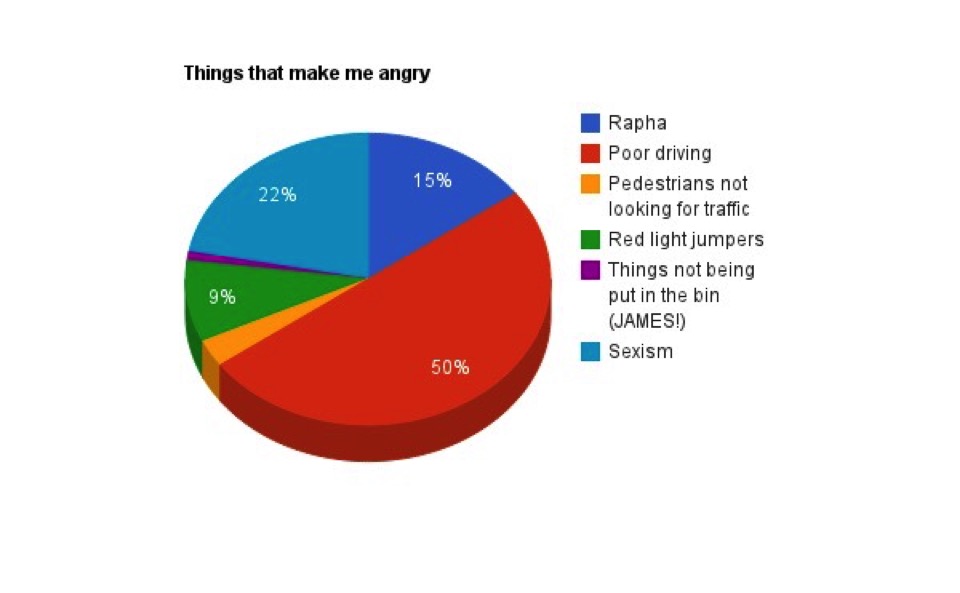
Hold on a second. 15% of your time being angry at Rapha? Wow. I get the controversial nature of the brand and yes I’ve read the occasional Road.cc review of a Rapha garment of clothing and the overt frothing of the mouth that follows from those who prefer to wear a club jersey or like their cheaper clothing brand. Some of which is fair perhaps and yes I’m not mad keen on the ‘suffering’ aesthetic, of which there’s a nice Medium article on. But the clothing is good and I like it which just is a choice. I don’t like Castelli as much but then I don’t proclaim to hate it or judge people who prefer that. I also really like my club jersey from Brixton.
Ok, so I took the bait and replied. What’s the problem with Rapha? 15% seems a lot for an adult to spend being angry at a brand.
@andymatthews £200 (golf) club membership. Join a club for £30/yr + learn group riding ppl! Red mist descending… must go to my safe place.
Naturally I took issue with this. Not with the membership issue – £200 is a lot and certainly isn’t accessible, if you’re near one of their clubs it’s a great deal on coffee though. But what I took issue with is that I actually learnt to ride in a group on the Thursday morning rides round Regents Park, best of all they’re totally FREE. I made this point but it was ignored as presumably it didn’t fit the narrative of hatred. Not only are those rides free but they even give you a free coffee for turning up. So yes I guess you can pay the golf club membership fee, or you can just turn up on a free ride in your DHB tights and club jersey and go riding. Having been going consistently to these since September I’ve met an amazing group of people through it, a point I again made. Whatever you think of the brand the riding that goes on through their clubs is pretty decent as is the local club scene at Brixton. Both are good and both have their benefits. That illogical hatred and unwillingness to have your viewpoint changed is kind of odd though. Isn’t it actually about the riding?
And then I think to the fact that I’ve been spending a lot of time with my 93 year old Grandmother and think how fortunate we all are to have the time to get angry about a cycle clothing brand for 15% of our lives. We could all do with being a bit more tolerant.
*Adam Buxton beautifully took this madness apart in one of his Bug shows which you really should watch.